

નમસ્કાર મિત્રો
Competitive gujarat બ્લોગમાં આપનું હાર્દિક સ્વાગત છે અમારા બ્લોગમાં Ms excel, Ms word, PowerPoint,googlesheet, google drive, Google doc તથા અવનવા ટેકનોલોજી રિલેટેડ post રજુ કરવામાં આવે છે.
એમએસ એક્સેલમાં ઘણીવાર પોતાની ફાઇલને સુરક્ષિત રાખવા માટે કે ફાઇલના ડેટાને સુરક્ષિત રાખવા માટે વર્ક બુક કે worksheetને પ્રોટેક્ટ કરવાની જરૂરિયાત ઊભી થાય છે. જ્યારે આપણી worksheet બીજા કોઈને શેર કરીએ ત્યારે મૂળ ડેટા સુરક્ષિત રહે તે માટે પણ વર્કશીટ ના કોઈ અમુક ભાગને પ્રોટેક્ટ કરવો જરૂરી બને છે .

એમએસ એક્સેલ સીટ ને પ્રોટેક્ટ કરવા માટે નીચેના સ્ટેપ્સ અનુસરો.
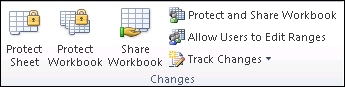
On the Review tab, click Protect Sheet.
In the Allow all users of this worksheet to list, select the elements you want people to be able to change.
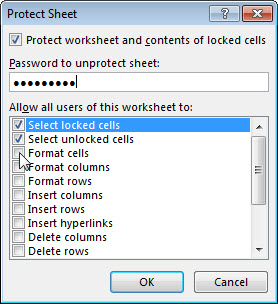
- Optionally, enter a password in the Password to unprotect sheet box and click OK. Reenter the password in the Confirm Password dialog box and click OK.
ઉપરોક્ત મુજબના સ્ટેપ નું અનુસરણ કરીએ તમે તમારી વર્કશીટને પ્રોટેક્ટ કરી શકો છો મિત્રો જો હજુ પણ આપને worksheetને પ્રોટેક્ટ કરવામાં કોઈ મુશ્કેલી જણાતી હોય તો નીચેનો વિડિયો જોઈ લો.
https://youtu.be/coZmpGUyPn8
અવા જ ટેકનોલોજી સભર આ વીડિયોને જોવા માટે અમારી ચેનલને સબ્સ્ક્રાઇબ કરવાનું ભૂલશો નહીં.
#Msexcel, #protectsheet, #competitivegujarat


0 Comments